Live Video Recorder - GREC
- 4.5
- Rating
- 100.00K
- Installs
- Free
- Price
 Analysis by App-foxy
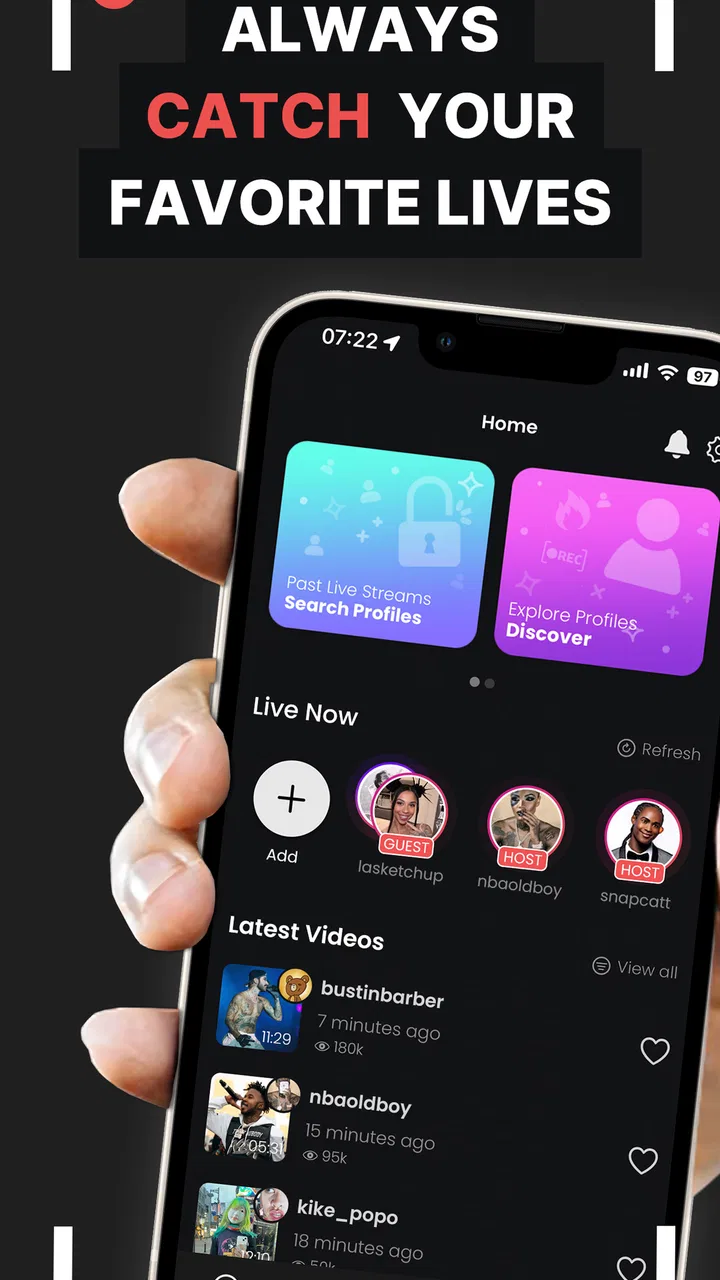
When I want to save a live broadcast, the biggest problem is usually timing. A normal screen recorder asks me to notice that a stream has started, open the recorder, adjust the controls, and begin recording before anything important happens. Live Video Recorder - GREC takes a different approach: it is built around starting a recording automatically when a live video begins. That makes it a focused social app rather than a general-purpose recording tool.
I reviewed it as someone who occasionally follows live content but does not want to sit beside the phone waiting for a broadcast to appear. The appeal is easy to understand. If the app recognizes the beginning of a supported live session and starts capturing it, the phone can do the repetitive part while I get on with something else. The trade-off is that automatic recording needs careful setup and sensible storage habits. It is not a magic solution for every video service or every recording need.
What to decide before installing Live Video Recorder - GREC
The first question is not whether recording live video sounds useful. It is whether I need automatic capture of live broadcasts specifically. If I only record occasional tutorials, video calls, game sessions, or clips already playing on my screen, a conventional screen recorder may be simpler. This app makes more sense when missing the opening moments of a live session is the problem I am trying to solve.
You May Also Like

 AccuWeather: Weather Radar
AccuWeather Review: A Quick, Clear Forecast for Everyday Decisions
For everyday plans, the best forecast is the one you can understand quickly. AccuWeather makes rain timing, radar, and local conditions easy to act on, with a few trade-offs.

 Hill Climb Racing
Why Hill Climb Racing Still Turns Crashes Into One More Run
A tiny car, a bumpy hill and one more upgrade: Hill Climb Racing keeps resurfacing because its simple chaos makes every near-miss feel personal.

 AliExpress - Shopping App
AliExpress Makes Global Shopping Feel Personal, but Shoppers Bear the Risk
AliExpress turns a global marketplace into a pocket-sized discovery engine. Its reach is useful, its shopping loop compelling, and its trade-offs easy to miss.

 Lords Mobile: Kingdom Wars
Lords Mobile Is a Kingdom-Building Routine, Not a Quick Match
A case-by-case verdict on the building, battles, device demands, and social commitments that make Lords Mobile rewarding for some players and exhausting for others.

 PDF Scanner app - TapScanner
TapScanner Makes Paperwork Easier to Capture, Check, and Share
TapScanner makes scanning with a phone feel less like a rescue operation and more like a dependable step in getting work done. Its capture tools are useful, though not flawless.

 Block Blast!
 Shows How Much a Puzzle Game Can Leave Out
A quiet grid game shows why puzzle players increasingly value instant clarity, repeatable skill and low-pressure play—and where the genre still needs to catch up.
More From Our News Desk
View All News


The app is listed in the Social category and is developed by GREC: Screen Recorder. It is free to install, with optional in-app purchases ranging from $1.99 to $59.99 per item. I would treat that pricing structure as a reason to inspect the available purchase choices before committing to a long-term workflow, especially if I only need the recorder for a few broadcasts.
Device compatibility is also part of the decision. Live Video Recorder - GREC requires Android 7.0 or later, so it is not aimed at very old Android phones. The current version is 4.9.3, and the app has been available since Jul 14, 2020. Those details do not guarantee identical behavior on every handset, but they do make the basic installation question straightforward: check the Android version first, then make sure the phone has enough free space for the recordings I expect to keep.
I would also think about the type of live content involved. A short event that I watch once is easy to manage. A busy schedule of long broadcasts creates a different problem: automatic recording can produce large files, consume battery, and leave me with recordings I never review. The feature is most valuable when the content is genuinely difficult to catch live and worth revisiting later.
How I would set it up for dependable use
My first practical step would be a short test rather than trusting the app with an important event. I would select the live source, start a brief broadcast or wait for a low-stakes session, and then check whether the recording begins as expected. This test answers more useful questions than a store description can: whether the chosen service is detected reliably, whether the screen remains active in the right way, and whether the resulting file is saved where I can find it.
Automatic tools work best when I prepare the phone before leaving it alone. I would charge the device, close unrelated apps, and check available storage. I would also avoid starting with several possible broadcasts at once. A single known stream makes it easier to understand what the app is watching and whether it has captured the correct material.
A small but important habit is to label or organize recordings immediately after a session. Auto-recording is convenient precisely because I may not be present when a file is created. Without a simple naming routine or a dedicated folder, useful clips can become difficult to identify later. I would reserve automatic capture for broadcasts that have a clear purpose, then remove failed tests and unwanted files before the next recording.
There is another trade-off that is easy to overlook: the phone is doing work while I am not watching it. A long recording can affect battery life and storage, and a device that becomes warm or runs low on space can make the whole arrangement less dependable. I would not use this as a set-and-forget system on a phone that is already struggling with battery health or limited storage.
Where the automatic approach is genuinely better
The strongest part of Live Video Recorder - GREC is the change in timing. A manual recorder depends on my attention at exactly the moment a live stream begins. This app is designed to remove that obligation. For recurring broadcasts, surprise sessions, or content that starts while I am commuting, working, or asleep, that difference can be more useful than a long list of editing features.
Imagine following a creator whose live discussions begin irregularly. I may know that a session is likely but not the precise moment it will appear. With a manual recorder, I either keep checking the app or accept that I might miss the introduction. With an automatic workflow, I can prepare the phone in advance and review the saved video later. That is a realistic everyday use case, and it explains why this app can feel more practical than a standard recorder even if both ultimately capture the screen.
It can also help with time-zone problems. If a live event happens when I am unavailable, the recording can turn a fixed appointment into something I watch on my own schedule. I would still check the rules of the service and the expectations of the broadcaster before saving or sharing anything, but for personal catch-up, the convenience is clear.
The focused design is another advantage. I do not have to treat every live video as a one-off manual task. Once the workflow is understood, the app can act as a background helper for the specific kind of capture it supports. That is a narrower benefit than full editing or broadcasting software, but it is also the reason I would choose it over a feature-heavy alternative.
Its audience size suggests that the idea has found a real user base: the app shows an average rating of 4.5 from around 3.8 thousand ratings, with over 100 thousand installs. I would read those figures as evidence of interest rather than a guarantee. Automatic recording depends heavily on the individual phone, Android behavior, and the source being recorded, so my own test would matter more than the rating alone.
Useful workflows beyond simply pressing record
One useful workflow is the “record, review, trim elsewhere” approach. I would use this app for capture, not assume it replaces a video editor. After the live session, I could keep only the relevant section with another tool if needed. This division of labor is sensible because an automatic recorder solves the problem of not missing the stream; it does not necessarily solve the problem of presenting a polished clip.
A second workflow is selective scheduling by habit rather than recording everything. Before an expected event, I would prepare the app and clear space. Afterward, I would check the file promptly and turn the setup back into a normal phone routine. This reduces accidental recordings and keeps the app from becoming a silent source of clutter.
A third insight is that automatic capture is especially useful for reference material. I could save a live demonstration, a discussion I want to revisit, or a broadcast containing instructions that are hard to follow in real time. In those cases, the value is not just entertainment. The recording becomes a personal reference copy, which makes organization and file review more important than the initial capture itself.
I would be cautious with privacy. A recorder can capture notifications, incoming messages, account details, or other content visible on the screen while the broadcast is running. Before leaving the phone unattended, I would silence notifications and keep unrelated conversations away from the display. That is a practical precaution for any screen-capture workflow, but automatic recording makes it more important because I may not be watching the screen while the file is created.
Where a different kind of app may fit better
Live Video Recorder - GREC is not automatically the best choice for every recording task. If I need precise manual control, a phone’s built-in screen recorder may be more comfortable. It is usually easier to start exactly when I choose, stop immediately, and avoid capturing unrelated moments. For a one-minute clip or a quick demonstration, setting up automatic detection could be unnecessary friction.
If my priority is editing, a dedicated video editor is a better fit. I would want tools for cutting, captions, transitions, audio adjustments, or exporting in a particular format. This app’s main value is capturing a live session at the right time, not turning raw footage into a finished production.
For creators who broadcast their own content, a streaming or production app may also be more appropriate. Those tools are built around controlling a live output, managing scenes, or interacting with viewers. Live Video Recorder - GREC serves the viewer who wants to save a live video, not the broadcaster who needs a complete studio workflow.
Cloud-based recording services can be preferable when local phone storage is the main limitation, although they bring their own account, network, and privacy considerations. I would not switch to one simply because it sounds more advanced. I would choose it when I need recordings available across devices or when the phone should not carry large files. Conversely, local capture can be more convenient when I want a file immediately on the device and do not want to depend on a separate service.
The key comparison is therefore about control versus convenience. Manual recording gives me more direct timing. Editing software gives me more finishing power. Cloud workflows may reduce local storage pressure. This app wins when the most expensive mistake is forgetting to press record at the beginning of a live broadcast.
What switching to this app really involves
The cost of switching is not limited to money. I have to learn a new recording routine, test whether it behaves correctly with my preferred live source, and create a way to manage the files afterward. The free entry point makes experimentation easy, but optional purchases mean I would review the in-app choices carefully instead of assuming every useful capability is included without cost.
There is also a habit change. With a manual recorder, I decide when capture starts. With an automatic recorder, I need to think in advance about what should be watched, what should be saved, and when the setup should be disabled or cleaned up. That can be a benefit for regular live viewers, but it may feel like extra preparation for someone who records only once in a while.
I would not switch immediately for an important event. I would run a controlled test, inspect the saved result, and confirm that the recording contains the expected beginning rather than only the portion after I noticed it. I would then test a longer session to see how the phone handles the workload. This is a better decision process than relying on the promise of automatic capture alone.
Storage planning deserves its own mention. I would decide beforehand whether recordings are temporary or archival. Temporary files should be reviewed and deleted soon after watching. Important files should be moved into an organized collection, with a note about the date or subject. This simple system prevents the common failure where the app works correctly but the recording becomes effectively lost among unnamed videos.
Compatibility is another switching cost. Even when the Android requirement is satisfied, the experience may vary according to the device and the live platform involved. I would keep expectations realistic: automatic detection is the central promise, but no recording workflow should be treated as infallible without a test. For content that cannot be missed, I would keep a backup plan, such as checking whether the broadcaster offers a replay.
Who should use it and who should skip it
I would recommend this app to Android users who regularly follow live broadcasts and have missed openings because they were not at the phone at the right moment. It is also a good candidate for people who want a personal archive of selected live sessions and are willing to manage storage afterward. The free installation makes it reasonable to test before deciding whether the workflow belongs in a daily routine.
I would be more cautious recommending it to someone who records only short clips, needs advanced editing, or wants exact manual control over every second. Those users may be happier with a built-in recorder or a dedicated capture-and-edit application. I would also skip it for sensitive situations where unattended screen capture could expose private notifications or conversations.
The Everyone content rating makes it broadly approachable, but that does not remove the need for responsible use. Recording a live video can involve other people’s voices, images, or copyrighted material. I would keep recordings for appropriate personal use unless I had permission to share them, and I would avoid treating the ability to capture something as permission to redistribute it.
My final recommendation is positive but specific: choose Live Video Recorder - GREC when automatic timing is the problem you need solved. It is a focused social recording tool, not a universal replacement for manual capture, editing software, or a broadcasting suite. Its real strength is giving me a better chance of preserving a live session I would otherwise miss.
I would install it, run a short test, check the saved file, and then use it selectively rather than recording every broadcast by default. That approach gets the convenience without ignoring battery, storage, privacy, or compatibility. For the right viewer, the app can quietly remove one of the most annoying parts of live video: having to be present at exactly the right second.
FAQs for Live Video Recorder - GREC
01What is Live Video Recorder - GREC used for?
Live Video Recorder - GREC is designed to record video while you are using your device, making it useful for capturing live events, demonstrations, tutorials, gameplay, video calls, or other on-screen activity. Before downloading, check the app’s current feature list because recording options, supported formats, and available tools may vary depending on your Android or iOS version and device model.
02Can Live Video Recorder - GREC record video in the background or with the screen turned off?
The app’s background and screen-off recording capabilities may depend on the operating system, device manufacturer, and the permissions granted during setup. Some phones restrict recording when the display is locked or another application is active. It is best to test a short recording first and review the app’s settings so you understand exactly how recording behaves before relying on it for important footage.
03Does Live Video Recorder - GREC record audio as well as video?
Live Video Recorder - GREC may offer audio recording alongside video, but the available sources can differ between devices. Depending on system restrictions, you may be able to capture microphone sound, internal audio, or both. Headphones, privacy settings, and other applications can also affect the result. Always make a brief test recording to confirm that the sound quality and audio source meet your needs.
04Is Live Video Recorder - GREC free to download, and are there advertisements or in-app purchases?
The download model and available features can change over time, so users should review the store listing before installing Live Video Recorder - GREC. The free version may include advertisements, limitations, or optional paid features, while some tools could require an upgrade. Check the pricing details, subscription terms, and cancellation policy carefully if the app offers in-app purchases.
05Where are recordings saved, and what permissions does the app require?
Recordings are generally saved in the app’s designated folder or the device’s media gallery, although the exact location can vary by operating system and settings. Live Video Recorder - GREC may request access to storage or photos, the microphone, notifications, and screen-recording functions. Grant only the permissions needed for the features you intend to use, and review the privacy information before recording sensitive content.
Pros
- Records video discreetly while using other apps or with the screen off.
- Supports scheduled recordings for hands-free capture.
- Simple controls make starting and stopping recordings quick.
- Can continue recording with the device locked
- depending on permissions.
- Useful for documenting events without keeping the preview open.
Cons
- Background recording may increase battery and device temperature.
- Requires camera
- microphone
- and storage permissions to work properly.
- Some phones may restrict recording when battery optimization is enabled.
- Recorded files can use substantial storage
- especially at higher resolutions.
- Features and reliability may vary across Android devices and OS versions.

Live Video Recorder - GREC
Gallery